

Every Step You Need for a Successful Relocation
A successful office move isn’t about perfection–it’s about preparation. This office moving checklist covers every critical step from the moment you decide to move until you’re settled in your new space. Print it, share it, customize it for your needs. Most importantly, use it.
Download our complete Office Moving Checklist as an interactive Google Sheet with checkboxes, assignment columns, and progress tracking.
Why Many Office Moves Struggle (And How This Checklist Prevents That)
Office moves typically derail for three reasons: inadequate timeline planning, poor communication, and missing critical dependencies. This checklist addresses all three by providing a structured timeline, built-in communication touchpoints, and careful sequencing of interdependent tasks.
The timeline assumes a 12-week planning period for a standard office move. Can you do it faster? Yes, but you’ll risk more issues and may pay premium rates. Should you take longer? For complex moves, absolutely. This checklist scales both ways.
Your 12-Week Countdown
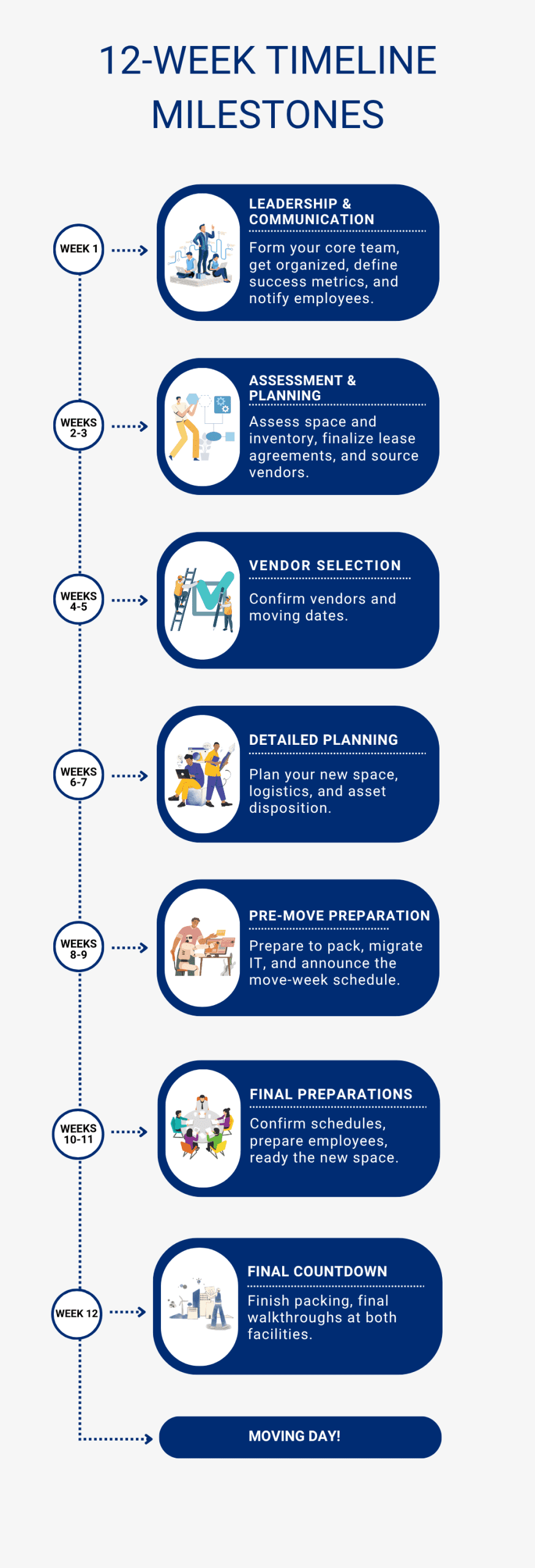
12 Weeks Before The Move: Foundation Setting
Leadership and Governance
- [ ] Appoint a dedicated Move Manager with decision-making authority
- [ ] Form your core move team with representatives from Facilities, IT, HR, and Finance
- [ ] Schedule weekly move team meetings through the transition
- [ ] Create a shared project folder with standardized file structure
- [ ] Define success metrics (acceptable downtime, budget variance, employee satisfaction targets)
Strategic Planning
- [ ] Document the business case for moving
- [ ] Set the official move date and any backup dates
- [ ] Establish total budget with 20% contingency
- [ ] Create high-level project timeline
- [ ] Identify potential risks and mitigation strategies
Initial Communications
- [ ] Brief executive leadership on move plans
- [ ] Prepare initial employee announcement
- [ ] Schedule all-hands meeting for formal announcement
10-11 Weeks Before: Assessment and Planning
Space and Inventory
- [ ] Conduct comprehensive inventory of all furniture, equipment, and supplies
- [ ] Obtain floor plans for new location
- [ ] Measure all access points at both locations (doors, elevators, stairwells)
- [ ] Identify items requiring special handling (artwork, server equipment, safes)
- [ ] Determine what moves, what stays, what gets replaced
Lease and Legal
- [ ] Review current lease for move-out obligations
- [ ] Provide required notice to current landlord
- [ ] Finalize new lease negotiations
- [ ] Understand restoration requirements for current space
Vendor Research
- [ ] Create a list of potential moving companies (minimum 3)
- [ ] Research IT infrastructure vendors for new location
- [ ] Identify furniture vendors if purchasing new items
- [ ] Find qualified decommissioning partners
Pro Tip: Professional office movers know the ins and outs of relocating a business. They can handle many of these tasks, saving you time and stress. When planning your move, ask about the full range of services they offer to see how they can support your team.
8-9 Weeks Before: Vendor Selection

Moving Company Selection
- [ ] Issue RFPs to qualified moving companies
- [ ] Schedule facility walkthroughs at both locations
- [ ] Collect and review proposals
- [ ] Check references and insurance certificates
- [ ] Select moving company and sign contract
- [ ] Confirm moving dates and backup dates
IT and Infrastructure
- [ ] Order internet and phone services for new location (critical: can have long lead times)
- [ ] Select cabling vendor for new space
- [ ] Schedule IT infrastructure installation
- [ ] Plan server room or network closet setup
- [ ] Design workstation connectivity layout
Employee Communication
- [ ] Hold all-hands meeting to announce move details
- [ ] Distribute an FAQ document to staff
- [ ] Create a dedicated email/Slack channel for move questions
- [ ] Share new office highlights and benefits
- [ ] Address initial concerns and questions
6-7 Weeks Before: Detailed Planning
Space Planning
- [ ] Finalize seating arrangements and department layouts
- [ ] Assign individual workstations
- [ ] Plan collaborative and quiet zones
- [ ] Designate storage areas
- [ ] Confirm furniture placement plans
Logistics Planning
- [ ] Book freight elevators at both buildings
- [ ] Secure loading dock reservations
- [ ] Apply for necessary parking permits
- [ ] Arrange for building protection (floor coverings, corner guards)
- [ ] Confirm building insurance requirements
Asset Disposition
- [ ] Tag items for move, sale, donation, or disposal
- [ ] Schedule furniture liquidation
- [ ] Arrange donation pickups
- [ ] Plan IT equipment recycling
- [ ] Document items for tax purposes
4-5 Weeks Before: Pre-Move Preparation

Packing Preparation
- [ ] Order packing supplies (boxes, labels, tape, bubble wrap)
- [ ] Create labeling system and color coding scheme
- [ ] Distribute packing guidelines to employees
- [ ] Assign packing responsibilities by department
- [ ] Schedule packing support for special items
IT Migration Planning
- [ ] Complete full data backup
- [ ] Test backup restoration procedures
- [ ] Create detailed IT migration schedule
- [ ] Plan for minimal downtime windows
- [ ] Arrange vendor support for critical systems
- [ ] Test new location internet and phone connections
Communication Updates
- [ ] Send employee packing timeline and instructions
- [ ] Share personal item guidelines
- [ ] Provide new office address and parking information
- [ ] Announce move week schedule
- [ ] Begin client/vendor notifications
2-3 Weeks Before: Final Preparations
Confirmations
- [ ] Confirm moving crew size and arrival times
- [ ] Verify elevator and loading dock reservations
- [ ] Confirm all vendor schedules
- [ ] Double-check permit approvals
- [ ] Review and confirm floor plans with movers
Employee Preparation
- [ ] Distribute packing supplies to all employees
- [ ] Hold department-specific move briefings
- [ ] Share emergency contact information
- [ ] Explain move-day procedures
- [ ] Address last-minute concerns
New Space Readiness
- [ ] Complete any construction or painting
- [ ] Ensure HVAC systems are operational
- [ ] Test all utilities and services
- [ ] Install and test security systems
- [ ] Verify IT infrastructure is ready
1 Week Before: Final Countdown
Monday of Move Week
- [ ] Begin packing non-essential items
- [ ] Label all technology equipment and cables
- [ ] Secure confidential documents
- [ ] Back up all computer data
- [ ] Remove personal items from desks
Tuesday-Wednesday
- [ ] Continue systematic packing by department
- [ ] Clear out refrigerators and kitchen areas
- [ ] Pack up supply rooms and storage areas
- [ ] Disassemble furniture requiring breakdown
- [ ] Protect and wrap sensitive equipment
Thursday (Day Before Move)
- [ ] Complete all packing
- [ ] Conduct final inventory check
- [ ] Secure IT equipment for transport
- [ ] Clear all personal belongings
- [ ] Do final walkthrough with move manager
- [ ] Distribute move-day instructions
- [ ] Set out-of-office messages
Move Days: Execution

At Origin Location
- [ ] Move manager arrives before crew (6-7 AM)
- [ ] Verify crew size and equipment
- [ ] Conduct safety briefing
- [ ] Begin systematic loading per plan
- [ ] Monitor packing of fragile items
- [ ] Track inventory as items leave
- [ ] Address issues immediately
- [ ] Complete final walkthrough
- [ ] Secure building before leaving
At Destination Location
- [ ] Receiving team ready before first truck
- [ ] Direct placement using floor plans
- [ ] Verify delivery of all items
- [ ] Check for damage immediately
- [ ] Supervise furniture assembly
- [ ] Oversee IT equipment placement
- [ ] Test critical systems
- [ ] Secure building at day’s end
Communication During Your Move
- [ ] Send morning status update
- [ ] Provide hourly progress reports to leadership
- [ ] Address employee questions in real-time
- [ ] Document any issues or damage
- [ ] Confirm completion status
First Week in Your New Space: Stabilization
Day 1 (First Business Day)
- [ ] Have IT support on site early
- [ ] Greet employees with welcome materials
- [ ] Provide office orientation tours
- [ ] Address immediate workspace issues
- [ ] Ensure all critical systems are operational
- [ ] Distribute new access cards/keys
- [ ] Update emergency evacuation procedures
- [ ] Handle urgent adjustments
Days 2-5
- [ ] Continue IT support and troubleshooting
- [ ] Complete remaining furniture assembly
- [ ] Resolve workspace adjustment requests
- [ ] Activate all building services
- [ ] Update business listings and directories
- [ ] Process final vendor deliveries
- [ ] Submit change of address to postal service
- [ ] Begin old space decommissioning
Weeks 2-4: Optimization
Old Space Closeout
- [ ] Remove all remaining items
- [ ] Complete required repairs
- [ ] Patch and paint walls as needed
- [ ] Professional deep cleaning
- [ ] Final walkthrough with landlord
- [ ] Return all keys and access cards
- [ ] Close out utility accounts
- [ ] Retrieve security deposit
New Space Refinement
- [ ] Fine-tune HVAC settings
- [ ] Adjust lighting as needed
- [ ] Optimize workspace configurations
- [ ] Add missing furniture or equipment
- [ ] Install final signage
- [ ] Complete artwork installation
- [ ] Set up remaining common areas
- [ ] Establish new office procedures
Administrative Updates
- [ ] Update website with new address
- [ ] Order new business cards
- [ ] Update marketing materials
- [ ] Notify all vendors of address change
- [ ] Update insurance policies
- [ ] File change of address with banks
- [ ] Update business licenses
- [ ] Revise emergency contact lists
30-60-90 Day Reviews: An Office Checklist for Continuous Improvement

30-Day Review
- [ ] Conduct employee satisfaction survey
- [ ] Review IT system performance
- [ ] Assess workspace functionality
- [ ] Address outstanding issues
- [ ] Document initial lessons learned
60-Day Review
- [ ] Analyze productivity metrics
- [ ] Evaluate space utilization
- [ ] Review actual versus budgeted costs
- [ ] Process final vendor invoices
- [ ] Submit insurance claims if needed
90-Day Review
- [ ] Complete comprehensive post-move assessment
- [ ] Document final lessons learned
- [ ] Calculate total move costs
- [ ] Close out project documentation
- [ ] Celebrate successful completion
Critical Considerations Beyond the Checklist
The IT Migration Reality Check
Your IT migration is your critical path. Period. While everything else is important, if your systems aren’t operational, nothing else matters. Start your IT planning first, give it the most attention, and have multiple contingency plans. Order internet circuits 60-90 days in advance–this is the most common cause of move delays.
The Building Requirements You’re Likely to Forget
Every building has quirky requirements that can derail your timeline if discovered late. Certificate of insurance requirements often need specific language that takes multiple iterations. Loading dock scheduling might require union operators. Freight elevators may have weight limits that affect how you pack. Get these requirements in writing early and share them with all vendors.
The Human Element
Your employees will have concerns you haven’t anticipated. Someone’s commute will double. Another person’s perfect parking spot will disappear. The coffee might taste different. Address concerns with empathy while maintaining momentum. Over-communicate, be transparent about challenges, and celebrate small wins throughout the process.
The Budget Reality
Your move will cost more than you think. Not because of poor planning, but because of discovered requirements, last-minute additions, and optimization opportunities you’ll want to pursue. That 20% contingency isn’t pessimistic–it’s realistic. Track costs weekly and make trade-off decisions early rather than late.
Make This Office Moving Checklist Your Own
This checklist is comprehensive, but your move is unique. Add items specific to your industry, company culture, or building requirements. Remove items that don’t apply. The best office moving checklist is the one you’ll actually use.
Consider assigning each section to a specific team member. IT owns their section, HR owns communications, Facilities owns vendor management. Clear ownership prevents tasks from falling through cracks.
Build in buffer time. If something seems like it will take a week, plan for two. If a vendor promises delivery on Monday, plan for Wednesday. This isn’t pessimism–it’s practical planning that prevents cascade failures when (not if) something runs late.
A Move Day Survival Kit
Beyond the checklist, prepare a move day survival kit:
- Phone chargers and backup batteries
- First aid supplies
- Tool kit with basics
- Cleaning supplies
- Toilet paper (seriously, new buildings often forget this)
- Snacks and water for the team
- Cash for tips and unexpected expenses
- Camera for documentation
- Backup contact lists (printed)
Final Thoughts: Progress, Not Perfection
No move is perfect. Things will go wrong despite your best planning. The moving truck will be late. The elevator will break. The wrong desk will end up in the CEO’s office. That’s normal.
What matters is having a plan, working the plan, and adapting as needed. This checklist gives you structure, but your judgment and flexibility will determine success. Trust your team, maintain your sense of humor, and remember that in six months, the move will be a distant memory but the improved workspace will benefit everyone daily.
The temporary chaos is worth the long-term gain. Your successful move starts with preparation, and you’ve already taken the first step by reading this checklist. Now print it, share it, and start checking those boxes. Your future settled-in self will thank you for the effort you put in today.
Remember: every successful office move started with someone feeling overwhelmed by the enormity of the task. The difference between success and disaster isn’t ability–it’s preparation. You’ve got this, and now you’ve got the ultimate office moving checklist to prove it.