Introduction
In short: A smooth office move comes down to three things: an accurate inventory, a timeline that starts at least 12 weeks out, and the one person who owns the plan. This planner walks you through every phase, from the decision to move to your post-move review, with checklists you can start using today.
Key takeaways
• Appoint one internal move manager as the single point of contact for every vendor, and day-to-day decision.
• Start planning at least 12 weeks out, and six months or more for a large or complex move.
• An accurate inventory is the foundation of an accurate quote and a smooth move day.
• Treat IT as the critical path: set up and test the new site before anything moves.
• Plan the first week in the new space as carefully as move day itself.
How to use this planner
• Short on time? Start with the quick-start checklist near the end, appoint your Move Manager and set a target date.
• Planning in full? Work through the phases in order, from the decision to move to your post-move review.
• Looking for one topic? Each phase stands on its own, whether you need help choosing a mover, planning your IT move or clearing your old space.
Your 12-week timeline at a glance
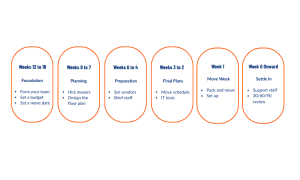
Most of the work happens long before move week, which is why the planning phases below carry the most detail.
Phase 1: Set goals with your team
Know why you’re moving
Your reason for moving drives every decision that follows, from location to furniture. The most common drivers are:
Growth: Plan for where you’ll be in three to give years, not just today.
Cost: Compare total occupancy costs, including utilities, parking and maintenance, not just base rent.
Talent and culture: Consider transit access, amenities and choosing a space that reflects your brand culture.
A better way of working: Ensure there are enough private offices, collaborative spaces, and anything else your team needs before sharing requirements with your realtor.
Set up clear roles
Office moves go wrong when nobody owns the decisions. A simple structure works for most organizations:
Senior decision-maker: approves the budget, sets direction and makes the final call on anything beyond the move manager’s authority.
Move manager: owns the project day to day, coordinates every workstream and is the single point of contact for staff and vendors
Core Move team: one representative each from Facilities, IT, HR and Finance, meeting weekly.
Wider stakeholders: department heads and office managers who give input and pass along updates to their reports.
Define success before you start
Agree on what success looks like: how much downtime is acceptable, how much budget variance you’ll tolerate, when IT must be fully running, and how you’ll measure employee satisfaction afterwards. Write it all down on one-page: your goals, scope, roles by name, the timeline and the budget. It becomes your reference point when “wouldn’t it be nice if” requests start to arrive.
Phase 2: Lay the groundwork
Create one home for move information
Even a well-planned move loses time when information is scattered across email threads and personal folders. People work from old versions, decisions get made twice, and details slip through the cracks. Set up one shared folder with sections for planning, vendors, communications, inventory, move day and post-move, and keep every document there.
Start your inventory early
Your inventory is the foundation of accurate quotes and a smooth moving day. For each item, record what it is, how many there are, the current location, the new location (including items for disposal), the condition, and any special handling it needs.
Pro Tip: assign each department or zone a colour, and use matching labels on items and on the new floor plan. A little time spent here saves hours of confusion on move day.
Plan the new space
Know where everything will go before a single box moves:
• Teams
• Equipment
• Hazardous materials
• Files and records
• Storage, break room, and supply items
• Technology infrastructure
Test your layout before you finalize it. It’s far easier to move furniture on paper than after installation.
Walk through the new space with the floor plan in hand. Reviewing the layout in the actual space, reveals what drawing may miss: a column in the way, a door that swings into a desk, or outlets and data ports in the wrong place. As you lay it out, keep walkways and exits clear, make every area accessible and leave room to grow.
Check building requirements at both sites
Discovered too late, building requirements can derail your timeline. Ask both building managers early about the following:
• Certificate of insurance requirements for your movers
• Loading dock and elevator booking procedures
• After-hours and weekend access
• Noise restrictions and allowed work hours
• Elevator dimensions and weight limits
• Protection required for lobbies and common areas
• Parking permits for moving trucks
Phase 3: Choose your movers
Request detailed quotes
The more complete your request, the more accurate, and comparable, your quotes will be. Share:
• Your move date, plus a backup date
• Your inventory summary: headcount, workstations and special items
• The services you need: packing, unpacking, disassembly, reinstallation, IT handling, disposal or storage
• Both addresses, and any building requirements
• Any phasing or after-hours requirements
Ask each mover for their commercial experience and references, insurance coverage, safety record, crew and supervision approach, and a line-item price that includes overtime rates and change-order terms.
Conduct a walkthrough
A walkthrough of both locations is how a mover spots what could affect cost and timing: stairwells, elevator limits, narrow corridors, loading docks, street access, and special items like server rooms, artwork or confidential records.
Questions that reveal how a mover really works
• “What happens if you find items that weren’t in the inventory?”
• “What’s your policy if we need to extend the move window?”
• “How do you keep track of sensitive materials from start to finish?”
• “Can you share references from moves like ours?”
• “How do you handle claims if something is damaged?”
Compare on more than price
The lowest quote isn’t always the best value, especially if it leaves out packing materials, installation or disposal. Weigh price alongside experience, insurance and safety, crew and equipment, project management and references. Before you sign, confirm that the contract spells out the scope, schedule, payment terms, change orders, cancellation, liability and insurance.
Phase 3: Choose your movers
Request detailed quotes
The more complete your request, the more accurate, and comparable, your quotes will be. Share:
• Your move date, plus a backup date
• Your inventory summary: headcount, workstations and special items
• The services you need: packing, unpacking, disassembly, reinstallation, IT handling, disposal or storage
• Both addresses, and any building requirements
• Any phasing or after-hours requirements
Ask each mover for their commercial experience and references, insurance coverage, safety record, crew and supervision approach, and a line-item price that includes overtime rates and change-order terms.
Conduct a walkthrough
A walkthrough of both locations is how a mover spots what could affect cost and timing: stairwells, elevator limits, narrow corridors, loading docks, street access, and special items like server rooms, artwork or confidential records.
Questions that reveal how a mover really works
• “What happens if you find items that weren’t in the inventory?”
• “What’s your policy if we need to extend the move window?”
• “How do you keep track of sensitive materials from start to finish?”
• “Can you share references from moves like ours?”
• “How do you handle claims if something is damaged?”
Compare on more than price
The lowest quote isn’t always the best value, especially if it leaves out packing materials, installation or disposal. Weigh price alongside experience, insurance and safety, crew and equipment, project management and references. Before you sign, confirm that the contract spells out the scope, schedule, payment terms, change orders, cancellation, liability and insurance.
Phase 4: Decide what’s moving
Choose an outcome for every item
A move is the best chance you’ll have to clear out unwanted inventory. Walk every space with your inventory checklist, check with department heads what’s essential, then give every item one of six outcomes:
• Keep and move: in good condition and right for the new space
• Reconfigure: modular furniture that can be adapted to the new layout
• Sell: items with resale value you no longer need
• Donate: usable items that can help schools, charities or community groups
• Recycle: items that can’t be reused but can be recycled responsibly
• Dispose: items with no remaining value
Recover value where you can
Selling surplus furniture and equipment, through a liquidator, direct sales or an employee sale, can offset part of your moving costs. If you donate to a registered charity, ask for a receipt and keep photos and records for your accountant.
Remove what your lease requires
Most commercial leases require you to return the space to its original condition. That can mean removing fixtures and installed furniture, patching and painting, repairing floors and professional cleaning. Read your lease early and budget for it, so restoration doesn’t become a last-minute cost.
Phase 5: Plan your IT move
IT is usually the most complex part of an office move, and the one with the highest stakes. Downtime costs money, and lost data can’t be recovered.
Inventory every system
List servers and network equipment, computers and monitors, printers, phones, security and access systems, audio-visual equipment, software licences and cloud services. Then map what depends on what, and decide which systems must be running first on Day 1.
Get the new site ready first
The secret to minimal downtime is setting up the new site before anything leaves the old one:
• Weeks ahead: order internet circuits early, since carriers can take months; complete cabling; install and test network and phone systems.
• The week or two before: test connections, confirm backups and recovery procedures, and run critical systems in parallel if you can.
• Move weekend: take a final verified backup, move the equipment, restore and test systems, then confirm with users before Monday.
Use the move to plan for growth too: add more network drops than you need today, plan wireless access point locations, and make sure your server room or network closet has the cooling, power backup and security it needs.
Protect data in transit
• Encrypt portable media and laptops
• Move sensitive equipment in sealed, tracked containers
• Keep chain-of-custody records
• Wipe or destroy old storage media through a certified e-waste recycler, and keep the certificates
• Update access cards, alarm codes and emergency contacts before Day 1
Phase 6: Furnish the new space
Reuse, reconfigure or replace
Systems furniture can often be reconfigured for a new layout, which can cost far less than buying new. If you are buying, order early: lead times are often several weeks, and longer for custom pieces. Check compatibility with what you’re keeping, and choose furniture that can adapt as you grow.
Plan for special items
• Modular furniture: photograph current configurations and label every component and its hardware.
• Artwork and high-value items: use professional art handlers and confirm your insurance covers them in transit.
• Plants: they need protection from temperature extremes, so plan their move like any other sensitive item.
Use the move to plan for growth too: add more network drops than you need today, plan wireless access point locations, and make sure your server room or network closet has the cooling, power backup and security it needs.
Plan for people
A move is a chance to improve ergonomics and comfort: adjustable chairs and desks, proper monitor positioning, sit-stand options where they fit, and layouts that share natural light.
Phase 7: Prepare for move day
Build an hour-by-hour schedule
Most office moves run over a weekend so the business keeps working. A typical schedule looks like this:
• Thursday evening: employees finish packing, and IT begins shutting down systems in sequence.
• Friday: crews load at the old site, with IT equipment first, then unload and place it at the new site.
• Saturday: furniture is assembled and placed, IT systems are restored, and departments walk through their areas.
• Monday: IT support is on site early, and employees arrive to a working office.
Give everyone a role
Beyond your Move Manager, name a site lead at each location, an IT lead, a representative for each department to check placement, and someone responsible for building access and security.
Label everything systematically
A consistent labelling system is the difference between a smooth move and a chaotic one:
• Give each department or floor its own colour, and match labels to the floor plan.
• Label every box with its department, floor, room and a sequence number, for example FIN-3-301-001.
• Post floor plans at elevators and entrances, and sign every room before the crew arrives.
Keep safety top of mind
Start with a safety briefing, keep paths and emergency exits clear, mark hazards, and have first aid on hand at both sites.
Plan for what could go wrong
Have a backup for the things most likely to slip: an elevator out of service, a vehicle breakdown, bad weather, an IT system that won’t come back up, or a key person who can’t be there. Keep building management contacts at both sites on hand around the clock.
Phase 8: Communication and change management
When you think you’ve communicated enough, keep going. People handle change far better when they know what’s happening and when.
Schedule your employee updates
• 12 weeks out: announce the move in person or by video, then follow up in writing with an FAQ and a way to ask questions.
• 8 weeks out: hold department meetings, offer tours of the new space and share packing guidelines.
• 4 weeks out: share the detailed schedule, desk assignments, parking and commute information.
• 1 week out: send final packing reminders, emergency contacts and the first-week plan.
• Move week: send daily updates.
Answer the questions people will ask
Your first announcement should cover why you’re moving, when, where, what it means for employees and how you’ll support them. Then get ahead of the most common worries:
• Commute: share transit and parking details, and consider flexible hours while people adjust.
• Workspace: share floor plans and seating early, and explain the reasons behind changes.
• Productivity: explain the plan for minimal downtime and where to get IT help.
Tell clients and partners
Give clients notice several weeks ahead, with your new address, the effective date and reassurance that service won’t be interrupted. Update vendors, both buildings’ management, and your business registrations and listings, including your Google Business Profile.
Phase 9: Control budget and risk
Budget for the whole move
Office moves usually cost more than the first estimate. Build your budget around five categories:
• Moving services: movers, packing materials, special handling, storage and after-hours premiums
• IT and telecom: internet and phone installation, cabling, network equipment and IT support
• Furniture and fixtures: new purchases, reconfiguration, installation, disposal and signage
• Professional services: project management, space planning, legal, permits and insurance
• Soft costs: communications, printing, a celebration and lost productivity
Then add a contingency. Many planners recommend 15 to 20 per cent of the total, because unexpected costs always appear.
Check your insurance
Confirm your mover’s coverage limits and claims process, and whether you need extra coverage for high-value items. Ask your insurer whether your policy covers business interruption and data during a relocation.
Identify your risks
For each major risk, decide in advance how you’ll reduce it:
• Vendor problems: keep backup vendor contacts.
• IT downtime: test thoroughly and keep a rollback plan.
• Weather: build flexibility into the schedule.
• Damage or loss: use professional packing and confirm insurance.
• Employee resistance: communicate early and often.
• Budget overrun: track spending weekly against the plan.
Phase 10: Settle into your new space
The first week
On Day 1, have IT support on site early and help people find their way. Over the first week, fix workspace issues, finish remaining assembly, update your business listings, and close out the old space: final walkthrough with the landlord, repairs, cleaning, utilities and returned keys.
30, 60, and 90 days
• 30 days: survey employees, check that systems and processes are working, and reconcile the budget.
• 60 days: adjust spaces that aren’t working, refine processes and celebrate the new office properly.
• 90 days: review how the space is actually being used, and record lessons learned for next time.
Plan for complex moves
• Heritage buildings and tight sites: measure every doorway, stairwell and elevator early, plan for disassembly and extra labour, and expect strict protection rules.
• Laboratory and medical equipment: follow the manufacturer’s moving requirements, record serial numbers and calibration status, and schedule recertification at the new site.
• Phased moves: split the move at natural break points, such as departments or floors, keep IT connected between sites and communicate clearly about who moves when.
• Server rooms and data centres: have the new site fully ready, take a verified backup, move system by system where you can and keep the ability to roll back.
The 10 most common office moving mistakes
1. Starting too late. Begin at least 12 weeks out, and six months or more for a complex move.
2. Treating IT as an afterthought. Make it your critical path.
3. Under-communicating. Use several channels, on a regular schedule.
4. No contingency. Budget for the unexpected and track spending actively.
5. Choosing movers on price alone. Compare experience, insurance and references too.
6. Finding Learning about building rules requirements too late. Collect requirements from both buildings early.
7. No plan for the old space. Plan decommissioning alongside the move.
8. Weak labelling. Use one colour-coded system everywhere.
9. Forgetting the first week. Plan Day 1 support as carefully as move day.
10. Not capturing lessons. Hold a retrospective and write it down.
Quick-start checklist
Leadership and structure
• Appoint a Move Manager as the single point of contact
• Form a core move team from Facilities, IT, HR and Finance
• Set up one shared project folder
• Define what success looks like
Baseline planning
• Confirm the move date and any phasing
• Complete a first inventory
• Review the new floor plans
• Set a budget with a contingency
Vendors and buildings
• Request quotes from qualified commercial movers
• Book walkthroughs at both locations
• Collect building requirements
• Engage IT and telecom vendors for the new site
Communication
• Announce the move and share an FAQ
• Set a regular update schedule
• Prepare client and partner notices
Logistics
• Decide what to keep, sell, donate or recycle
• Finish the IT plan, with downtime windows
• Book elevators, docks and permits
• Build the move-day schedule and contingency plans
After the move
• Work through the punch list
• Schedule 30-, 60- and 90-day reviews
• Gather feedback and record lessons learned
• Celebrate with your team
Frequently asked questions
How far in advance should we plan an office move? At least 12 weeks for a straightforward move, and six months or more for a large, multi-floor or complex one.
Who should manage an office move? One Move Manager with the authority to make decisions, supported by a core team from Facilities, IT, HR and Finance.
What’s the most important part of an office move? IT. Set up and test the new site before anything moves, so your team can work on Day 1.
How do we keep downtime to a minimum? Move after hours or over a weekend, prepare IT at the new site first, and plan the first week as carefully as move day.
Ready to plan your move?
Office Move Pro plans and delivers office moves from 13 locations across Canada, from Victoria to Halifax. Tell us about your office and we’ll prepare an accurate quote.
Get a quote